AI communication tools grounded in your material

Your material.
Your voice.
Ready for the question.

CuePal Studio builds tools for the moments when the words matter—whether the conversation begins with a question or the questions come after your presentation.

ListeningGrounded in your material
“Tell me about a time you turned a complex challenge into a clear result.”
Best prepared response

Start with the audience problem, establish the decision you made, then close with the measurable outcome.

Two products. Two distinct moments.

One helps you answer. The other helps you present—and then answer.

Product 01CuePal Prep iconCuePal PrepInterviews + Q&A
CuePal Prep · Interviews + Q&A

For when the conversation starts with a question.

Your Q&A buddy for high-stakes conversations.

CuePal Prep listens to each question, finds the best answer from everything you prepared, and combines multiple answers when needed. Your response appears in a built-in teleprompter, ready to deliver in your own voice.

Job interviewsMedia interviewsClient Q&AAdmissions
Choose CuePal Prep
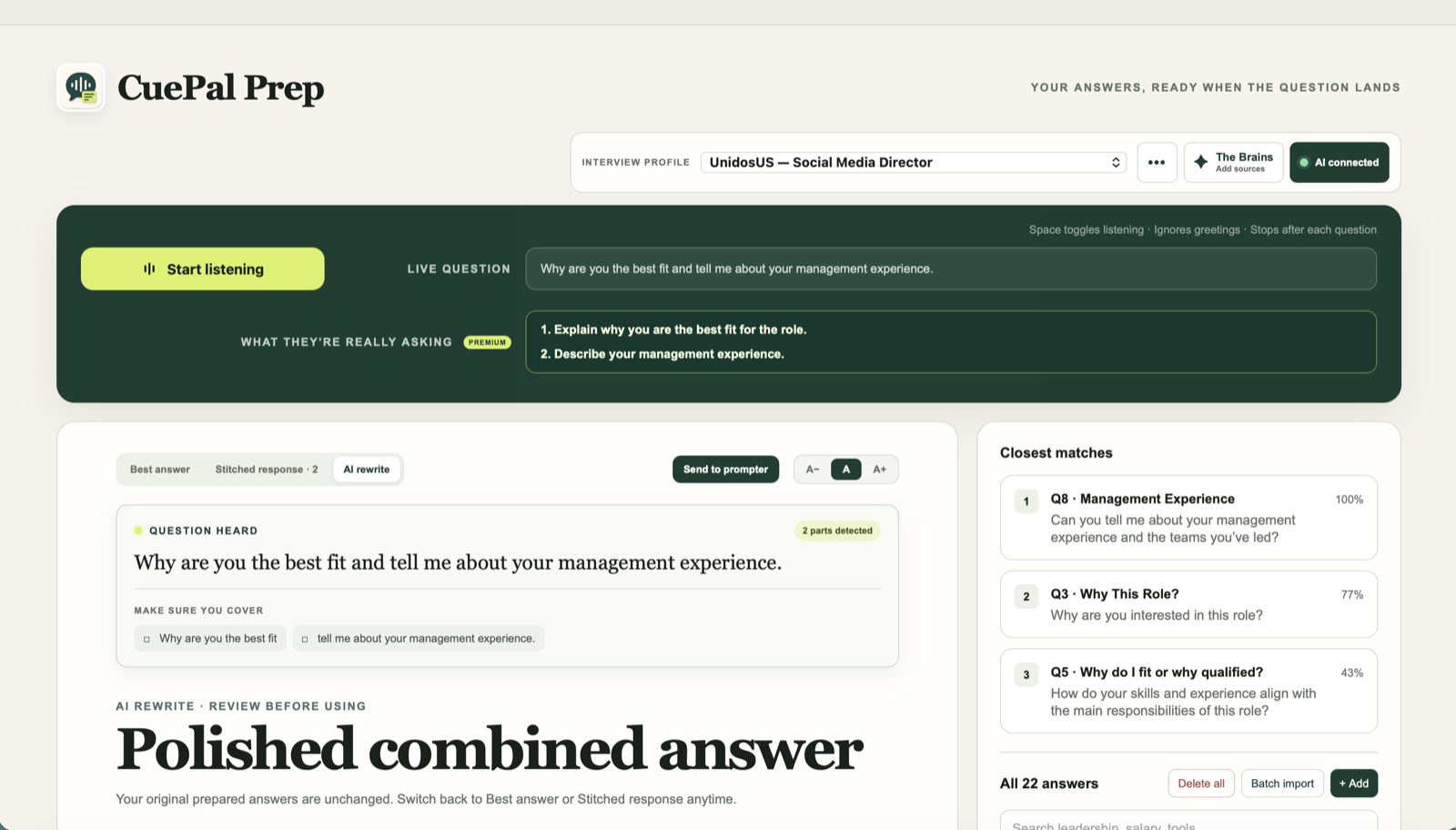
CuePal Prep matching a two-part interview question with prepared answers and creating a combined response
Product 02CuePal Live iconCuePal LivePresentations + Live Q&A
CuePal Live · Presentations + Live Q&A

Present first. Handle what comes next.

One copilot for the presentation and the questions that follow.

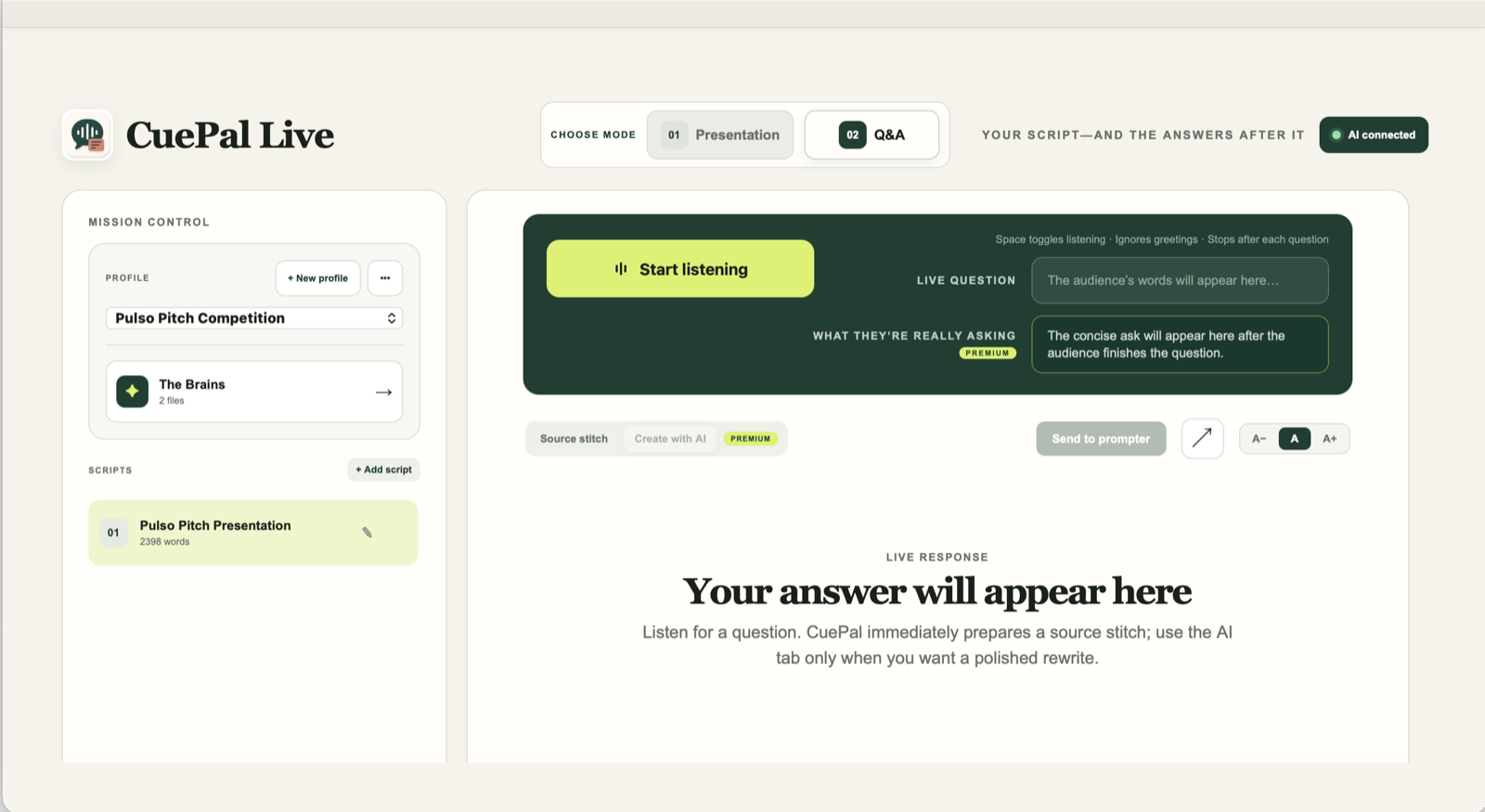
Use the built-in teleprompter to deliver your presentation. When the Q&A begins, CuePal Live listens to your audience and creates clear, grounded responses using the material you provided.

KeynotesPitchesPanelsWebinars
Choose CuePal Live
CuePal Live in audience Q and A mode with presentation controls, live listening, and teleprompter response area
Choose your CuePal

What kind of moment are you preparing for?

CuePal Prep and CuePal Live are separate products. Choose the one built for your situation.

The conversation is all Q&A

CuePal Prep

For interviews and other question-driven conversations where every response begins with what someone asks.

  • Listens for each question
  • Searches all your prepared material
  • Combines answers when needed
  • Built-in teleprompter
Prep access coming soon
You present, then take questions

CuePal Live

For presentations that need speaker support first and grounded audience responses afterward.

  • Presentation teleprompter
  • Switches into live Q&A
  • Grounds responses in your material
  • Separate CuePal Live access
Live access coming soon

Each CuePal product is purchased separately. Access to one does not include access to the other.

Two different workflows

How each CuePal works.

CuePal Prep

All Q&A
01

Add your preparation

Load the answers, stories, notes, and experience you want CuePal Prep to draw from.

02

Hear the question

CuePal Prep listens to each question and searches everything you prepared.

03

Get your strongest answer

It finds or combines the best material and places the response in the teleprompter.

CuePal Live

Present, then Q&A
01

Prepare the presentation

Add your script, supporting material, talking points, and possible audience questions.

02

Present with the teleprompter

Deliver your presentation with your prepared script available in speaker view.

03

Move into live Q&A

CuePal Live listens to the audience and creates grounded responses from your material.

Before you choose

Questions,
answered.

Are CuePal Prep and CuePal Live included together?

No. They are separate applications with separate access and payment. The family landing helps you choose the right product.

What information does CuePal use to create a response?

CuePal grounds its responses in the notes, answers, stories, and other material you prepare for your session.

Does CuePal speak for me?

No. CuePal prepares text in the built-in teleprompter. You remain responsible for reviewing and delivering the response in your own voice.

Which product should I choose for a job interview?

CuePal Prep is designed for question-driven conversations such as job interviews. Always follow the rules and disclosure requirements of the interview or organization.

Which product should I choose for a keynote or pitch?

CuePal Live supports the presentation itself and then transitions into audience Q&A.